Creating a branch
This page lists best practices that you need to follow when creating a new branch.
You should normally always follow these guidelines. Deviating from these guidelines is possible in advanced cases if you are an expert user and know why you are ignoring a particular guideline.
A branch must be a full copy of the trunk
A new branch must be a copy of the entire trunk directory. Or in some
advanced cases, a full copy of another existing branch (e.g. a copy of
my_feature_one). You shouldn’t create branches from individual files or from
subdirectories contained within a branch.
For example, even if you plan to edit just a single file on a separate feature
branch, you should still create the new feature branch as a copy of the whole
trunk directory. Then you can modify that desired file on that new feature
branch. Creating a new branch this way does not use up much storage space on the
server, since branches are cheap
storage-wise.
In TortoiseSVN
A typical way to create a new branch with TortoiseSVN is by using the
TortoiseSVN | Branch/tag context-menu command in Windows File Explorer. When
you run the TortoiseSVN | Branch/tag command on a local working copy folder,
the URL that this local folder currently reflects is used as the URL of the
source branch. It is the equivalent of the
SOURCE_BRANCH_URL used on
the command line.
To find out what repository URL a local working copy directory currently reflects, open Properties | Subversion from this local directory’s context menu in Windows File Explorer and see the URL at the top.
To ensure that the new branch starts as a copy of an entire existing branch,
make sure that the root directory of your working copy (for example,
my_work_dir) currently reflects the root of the desired source branch (for
example, reflects the repository’s trunk directory). Then run the
TortoiseSVN | Branch/tag command on the root directory of your working copy
(e.g. on my_work_dir), from the right-click context menu of that directory
(folder) in Windows File Explorer.
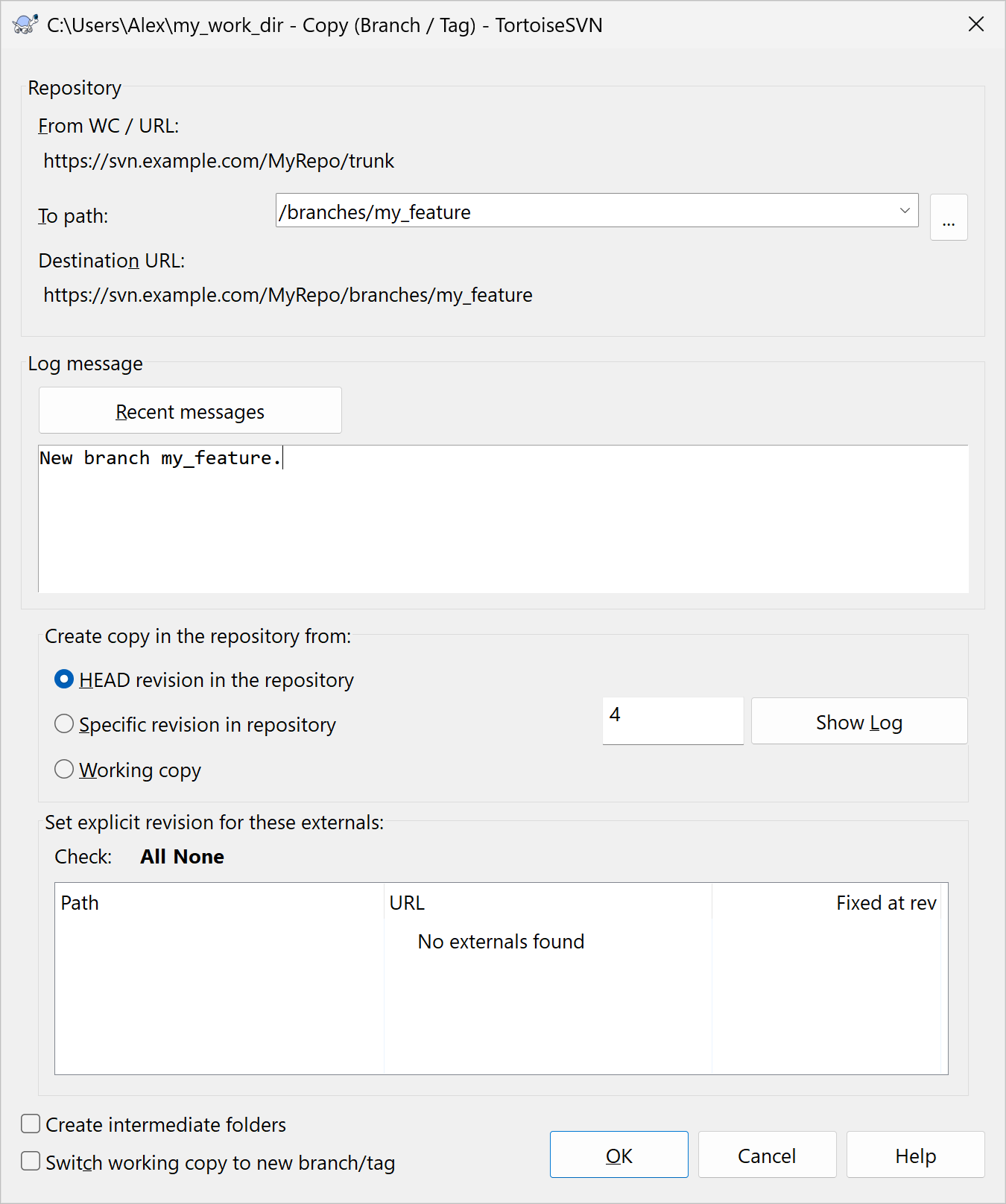
You can also verify that you are creating a new branch from the entire source
branch in the dialog window of the TortoiseSVN | Branch/tag command. In that
window, look at the From WC / URL information, which is equivalent to the
absolute SOURCE_BRANCH_URL used
on the command line. From WC / URL should specify the URL of the root
directory of the desired source branch (e.g.
https://svn.example.com/MyRepo/trunk):
Create a branch by making a remote URL to URL copy
To create a branch, use the svn copy command to make a remote tracked URL to
URL copy, where the copying occurs purely on the server side. This ensures the
following:
- The new branch is ancestrally related to the source branch that it is created
from, because the
svn copycommand makes a tracked copy. - The new branch is a faithful copy of a single revision of the source branch (by default, the copy of the HEAD revision).
To create a new branch or tag as a URL to URL copy with svn copy, both the
source and the destination arguments must be server-side entities specified
as URLs (either relative or absolute). For example:
C:\Users\Alex\my_work_dir> svn copy "^/trunk" "^/branches/my_feature" -m "Create branch my_feature."
Or equivalently:
C:\Users\Alex\my_work_dir> svn copy https://svn.example.com/MyRepo/trunk https://svn.example.com/MyRepo/branches/my_feature -m "Create branch my_feature."
Normally, you should not create a new branch from the local contents of your
working copy. That is, do not use local working copy paths as the source or
destination arguments in the svn copy command when creating a branch.
If a new branch is created from the local working copy contents, it might contain your local uncommitted changes that weren’t in the source branch in the repository. Furthermore, if a new branch is created from the local working copy contents, it may start as a copy of a mixture of revisions from the source branch. This can result in merge conflicts later.
In TortoiseSVN
In TortoiseSVN, this best practice simply means that you must not select the ‘Create copy in the repository from: Working copy’ option, when using the TortoiseSVN | Branch/tag command.